




A practical guide to what Unity Catalog is, how its governance model works, and how enterprises actually migrate to it, including field notes from a real multi-cloud implementation.
Databricks Unity Catalog provides a unified governance layer for enterprise data and AI assets across Databricks workspaces and cloud environments. This guide covers Unity Catalog architecture, governance, best practices, implementation, automation, limitations, and migration.
Why Does Multi-Cloud Data Governance Breaks Down
Most enterprises running Databricks across AWS, Azure, and GCP don’t have one data governance problem. They have as many as they have workspaces.
The pattern is familiar: each workspace runs its own Apache Hive Metastore (HMS). Each business unit builds its own access control logic on top. Over time, that isolation produces duplicate pipelines for the same data, inconsistent security models from team to team, manual configuration every time a workspace needs to talk to another, and audit trails that stop at the workspace boundary instead of covering the enterprise.
None of this is a tooling failure. It’s what happens when metadata and security live at the workspace level instead of the account level. Databricks Unity Catalog exists to fix exactly that: it centralizes metadata, access control, and audit logging into a single governance layer that spans clouds, workspaces, and asset types, from tables and files to ML models and AI agent tools.
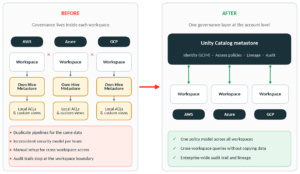
Figure 1: Fragmented workspace-level governance vs. one account-level Unity Catalog layer
For enterprise environments, Unity Catalog governance provides a common foundation for access control, metadata, lineage, auditability, and security policy across workspaces. This shifts governance from isolated workspace configurations toward consistent account-level controls.
This guide covers how Databricks Unity Catalog’s governance model actually works, the concepts you need before you migrate, and, drawing on a real enterprise implementation, what the migration path looks like in practice. It draws on field experience from Modak, a Databricks partner with certified expertise in Unity Catalog implementation and enterprise data governance.
What is Databricks Unity Catalog? (Definition & Overview)
Unity Catalog is Databricks’ unified governance layer for data and AI assets. It replaces workspace-scoped Hive metastores with a single, account-level metastore per region, and organizes every securable object under one three-level namespace: catalog.schema.object. That structure lets one governance model cover structured tables, unstructured files, ML models, and generative AI assets, instead of managing each asset type separately.
Databricks Unity Catalog Object Model
Unity Catalog’s foundation is a standardized namespace:
<catalog>.<schema>.<object>
Each level has a distinct job:
- Catalogs act as domain isolation boundaries, typically aligned to data mesh tiers such as raw_landing, silver_cleaned, gold_analytics, or a business-unit boundary like finance_prod.
- Schemas group logical business entities within a catalog, for example transactions or customer_360, and function as a namespace-level security boundary.
- Securable objects are the operational assets underneath: managed and external tables, dynamic views, unstructured file volumes, ML models, and registered functions.
Above all three sits the metastore itself, an account-level container, typically one per cloud region, that centralizes identity (SCIM) bindings, storage credentials, and enterprise security policy. Every workspace across AWS, Azure, and GCP attaches to a regional metastore, which is what enables cross-workspace queries without copying raw data or breaking perimeter security.
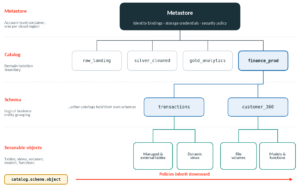
Figure 2: The Unity Catalog object model, from metastore down to securable objects
| Hierarchy level | Object type | What it governs | Inheritance |
| Top container | Metastore | Account-level identity, storage credentials, security policy | Root for all organizational assets |
| Level 1 | Catalog | Domain boundaries (e.g. finance_gold), mapped to isolated storage | Inherits metastore policy, cascades to schemas |
| Level 2 | Schema | Logical business entity grouping (e.g. customer_360) | Inherits catalog policy, cascades to objects |
| Level 3 | Securable object | Tables, views, volumes, ML models, functions | Inherits schema policy, receives fine-grained grants |
Compute attaches to this hierarchy through Databricks Runtime 11.3 LTS or higher and Serverless SQL Warehouses, both of which read the same governed namespace regardless of which cloud the workspace runs on.
Unity Catalog Access Control: ABAC vs Table-Level Grants
The bigger shift in Unity Catalog isn’t the namespace, it’s how access control moves from static, per-table grants to dynamic, tag-based Attribute-Based Access Control (ABAC).
In a legacy setup, access is usually a patchwork of table-level ACLs and hand-built dynamic SQL views, each maintained separately and each a potential gap. Unity Catalog instead lets you define a governed tag hierarchy at the account level, for example governance.sensitivity = ‘confidential’ or compliance.pii = ‘ssn’, that inherits automatically from catalog down to schema, table, and column. A policy written once against a tag applies to every current and future asset that carries it.
In practice, this is implemented through SQL functions and catalog-level policies. A masking function defines the logic; a policy binds it to any tagged asset:
Step 1: SQL function for column masking
CREATE FUNCTION mask_social_security(ssn STRING)
RETURNS STRING
RETURN CASE
  WHEN is_account_group_member('hr_compliance_auditors') THEN ssn
  ELSE CONCAT('XXX-XX-', RIGHT(ssn, 4))
END;
Step 2: Catalog-level ABAC policy enforcement
CREATE POLICY enforce_ssn_masking
ON CATALOG enterprise_dw
COLUMN MASK mask_social_security
TO `account users`
EXCEPT `hr_compliance_auditors`
FOR TABLES WHEN has_tag('contains_pii')
MATCH COLUMNS has_tag_value('pii_type', 'ssn') AS ssn_col
ON COLUMN ssn_col;
When a new dataset lands, agentic data classification scans it, applies the relevant governed tags, and the matching ABAC policy binds immediately, no manual grant required. At query time, Unity Catalog’s planner intercepts the request, evaluates the caller’s identity and the asset’s tags, and rewrites the execution plan on the fly. A query against enterprise_dw.finance.employee_records from a non-auditor identity gets the masking function substituted for the raw column before the query ever runs.
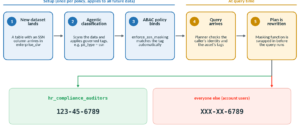
Figure 3: How a tag-based ABAC policy masks a sensitive column at query time – Databricks Unity Catalog
This changes the ownership model too: table owners can drop a row filter or view definition, but they cannot bypass a catalog-level ABAC policy. That distinction, moving enforcement above the table owner, is what lets a central governance team guarantee policy coverage instead of hoping every team applies it consistently.
| Mechanism | Scope | Defined by | Automation | Can owners bypass it? |
| Table-level filters/masks | Single table or column | ALTER TABLE … SET ROW FILTER | Manual, per table | Yes |
| Catalog-level ABAC policy | Catalog, schema, or any tagged asset | CREATE POLICY … ON CATALOG/SCHEMA | Automatic on newly tagged assets | No |
| Dynamic SQL views | Specific view definition | CREATE VIEW … AS SELECT | Manual, per use case | N/A, access granted on the view itself |
Databricks Unity Catalog Multi-Engine Support
A governance layer is only as useful as the engines that can honor it. Unity Catalog’s open-source protocol, UC OSS, exposes the metastore through standard OpenAPI specifications and the Apache Iceberg REST Catalog API, so non-Databricks engines can read and write governed data directly, without a copy.
Access is brokered through credential vending rather than direct credential sharing:
- An external engine (Spark, Trino, Starburst, DuckDB, Snowflake) authenticates to the Unity Catalog REST API using OAuth.
- Unity Catalog evaluates the caller’s identity, ANSI SQL grants, and any active ABAC rules.
- It issues short-lived, scoped cloud storage tokens (S3, ADLS Gen2, GCS) rather than long-lived credentials.
- The engine reads or writes Parquet/Delta files directly from storage, without routing raw data through the catalog’s control plane.
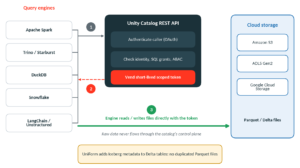
Figure 4: Credential vending lets external engines read governed data directly from storage – Databricks Unity Catalog
Universal Format (UniForm) extends this further by generating Apache Iceberg metadata for Delta tables asynchronously, with no duplicated Parquet files. Iceberg-native engines see the table as Iceberg; Databricks engines still see it as Delta, with deletion vectors and predictive I/O intact.
| Engine | Access path | Typical use case |
| Apache Spark | Native Unity Catalog client | High-throughput batch ETL |
| Trino / Starburst | Iceberg REST Catalog API | Distributed interactive SQL analytics |
| DuckDB | Iceberg REST + OAuth token vending | Fast local/in-process exploration |
| Snowflake | Iceberg REST / zero-copy | Cross-platform query without duplication |
| LangChain / Unstructured | Open REST endpoints | Contextual ingestion for GenAI agents |
Unity Catalog Lakehouse Federation and Delta Sharing Explained
Two capabilities extend Unity Catalog’s governance model outward: Lakehouse Federation for external systems you own, and Delta Sharing for data you don’t.
Lakehouse Federation connects foreign catalogs to external systems, including MySQL, PostgreSQL, Redshift, Snowflake, Azure SQL Database, Azure Synapse, and BigQuery, without extracting the data or building brittle ETL. Federation virtualizes the external schema inside the three-level namespace, pushes query predicates down to the source system, and applies the same ABAC policies and lineage tracking as native assets.
For sharing outside the organization, OpenSharing (Delta Sharing) uses zero-copy share definitions to give external partners live access to tables, file volumes, ML models, and notebooks without cloud egress fees. Where the collaboration itself is sensitive, for example a joint analysis between two companies that shouldn’t see each other’s raw records, Databricks Clean Rooms provide an isolated SQL/Python execution environment that returns only aggregate results.
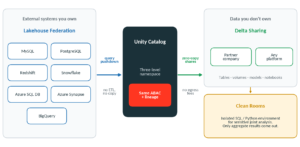 Figure 5: Lakehouse Federation brings external systems in; Delta Sharing and Clean Rooms extend governance outward
Unity Catalog Cost Governance: FinOps and System Tables
Governance isn’t only about who can see what, it’s also about what things cost and who’s accountable for that spend. Unity Catalog exposes this through system tables (system.billing.usage, system.access.audit, system.lineage) that sit inside a queryable system catalog rather than a separate billing export.
FinOps telemetry: DBU spend and cost attribution
SELECT
  usage_date,
  identity_metadata.run_as AS executed_by,
  usage_metadata.job_id AS databricks_job_id,
  sku_name,
  SUM(usage_quantity) AS total_dbus_consumed,
  ROUND(SUM(usage_quantity) * 0.40, 2) AS estimated_cost_usd
FROM system.billing.usage
WHERE usage_date >= CURRENT_DATE() - INTERVAL 30 DAYS
GROUP BY usage_date, executed_by, databricks_job_id, sku_name
ORDER BY total_dbus_consumed DESC;
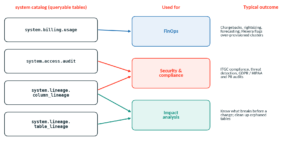
Figure 6: System tables turn billing, audit and lineage data into queryable governance signals – Databricks Unity Catalog
These tables integrate with FinOps platforms such as Flexera Data Cloud Optimization, which flags over-provisioned clusters, spending anomalies, and chargeback allocations across billing units. On the storage side, Managed Storage Isolation assigns physical cloud storage locations explicitly to catalogs and schemas, so business units are physically separated in storage, not just logically separated by permissions, which closes off a common source of unauthorized duplication.
| System table | Key attributes | What it captures | Primary use |
| system.billing.usage | usage_date, sku_name, usage_quantity, job_id, cluster_id | DBU consumption across infrastructure | Chargebacks, rightsizing, forecasting |
| system.access.audit | event_time, user_identity, action_name, securable_object | Permission changes, reads/writes, ABAC events | ITGC compliance, threat detection |
| system.lineage.table_lineage | source_table, target_table, executed_by, job_id | Table-level transformations across jobs | Impact analysis, orphan cleanup |
| system.lineage.column_lineage | source_column, target_column, statement_id | Fine-grained column mutations | GDPR/HIPAA audits, PII tracking |
Unity Catalog AI Governance: Managing ML Models, and Agent Tools
Unity Catalog’s scope extends past tables. Through Mosaic AI and MLflow integration, ML models register directly into the same catalog.schema.model namespace as any other asset. That means GRANT EXECUTE ON MODEL and ABAC rules control which services can invoke a model, and lineage is captured automatically from raw ingestion through feature engineering, training, and inference. LangChain and Unstructured API integrations let teams register document volumes and agent tool functions as securable entities under the same model.
Unity Catalog Metrics adds a semantic layer on top: certified metrics like Annual Recurring Revenue or Churn Rate are defined once and propagate to AI/BI Dashboards, Databricks Genie, notebooks, SQL engines, and external BI tools like Tableau, Power BI, and Hex, so the definition of a metric can’t drift between teams.
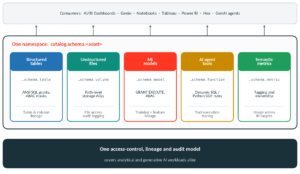
Figure 7: Data and AI assets share one namespace, one access model and one lineage and audit trail – Databricks Unity Catalog
| Asset type | Namespace | Governance mechanism | Lineage |
| Structured tables | catalog.schema.table | ANSI SQL grants, ABAC masks | Automated table/column lineage |
| Unstructured files | catalog.schema.volume | Path-level storage ACLs | File access audit logging |
| ML models | catalog.schema.model | GRANT EXECUTE, ABAC | Training pipeline + feature lineage |
| AI agent tools | catalog.schema.function | Dynamic SQL/Python UDF rules | Tool execution tracing |
| Semantic metrics | catalog.schema.metric | Tagging and ownership controls | Definition usage across BI targets |
Databricks Unity Catalog Best Practices
Beyond the initial setup, a handful of operating habits determine whether Unity Catalog stays governable as the number of catalogs, users, and workloads grows:
These Databricks Unity Catalog best practices help maintain consistent governance as the number of catalogs, users, workspaces, and workloads grows.
- Treat catalogs as the primary isolation boundary: Separate production from non-production, and sensitive domains from general-access ones, at the catalog level rather than trying to enforce that separation through grants alone.
- Own objects by group, never by individual: Individual ownership creates access gaps the moment someone changes roles or leaves; group ownership doesn’t.
- Grant coarse, restrict fine. Set broad permissions at the catalog or schema level and narrow them lower in the hierarchy, rather than accumulating one-off table-level grants, which become a maintenance burden at scale.
- Restrict who can create external locations: Unrestricted external-location creation is one of the few ways users can route around Unity Catalog’s controls entirely, so this permission should sit with a small admin group.
- Route audit logs to a central security system: Unity Catalog’s audit events are most useful when they feed the same monitoring pipeline as the rest of the security stack, with particular attention to unusual CREATE, ALTER, or DROP activity on catalogs and schemas.
- Use Delta Sharing for cross-team and external collaboration: It keeps governance controls intact in a way that direct cross-workspace grants or manual data extracts don’t.
Databricks Unity Catalog Implementation Guide
A Databricks Unity Catalog implementation should begin with governance and architecture decisions before tables are migrated. Establish the account-level identity model, define catalog and schema boundaries, configure storage credentials and locations, and determine how existing permissions map to the target governance model.
A practical implementation sequence is to assess the existing Hive Metastore estate and identities, provision the regional metastore and storage paths, map schemas and upgrade tables to the three-level namespace, and enforce target policies before cutover.
Assess existing Hive Metastore, identity, permissions, storage, pipelines, and workload dependencies.
Define catalog and schema boundaries before migrating large numbers of assets.
Provision the account-level metastore and required storage credentials.
Upgrade and validate tables, re-point workloads, and enforce the target governance model before cutover.
Unity Catalog Limitations and Considerations
Unity Catalog centralizes governance, but enterprises should also evaluate technical and operational limitations before adoption at scale.
Compute and runtime requirements: Some Unity Catalog capabilities depend on supported Databricks Runtime versions and compute configurations.
Legacy Hive Metastore dependencies: Existing workloads using hive_metastore may require assessment, namespace changes, and workload updates.
Workspace-level identity and permissions: Existing workspace-specific groups and permission models may need alignment with the account-level governance model.
Table and file formats: Organizations should validate the Unity Catalog capabilities and access model required by their managed and external tables and supported file formats.
Streaming workloads: Existing streaming pipelines should be tested against the target Unity Catalog architecture and access model.
Three-level namespace changes: Moving from schema.table to catalog.schema.object can require changes to references, pipelines, permissions, and dependent workloads.
External engines: Organizations using Trino, DuckDB, Snowflake, or other engines should validate their Unity Catalog access path and interoperability requirements.
Migration complexity: Moving from workspace-isolated Hive metastores still requires planning for identities, permissions, storage locations, pipelines, and business-critical workloads.
How Does the Unity Catalog Migrator (UCX) Framework Work?
Understanding the model is one thing; migrating a live enterprise estate off legacy Hive metastores onto it is another. Databricks Labs’ UCX (Unity Catalog Migration Experience) is the automation framework most implementations are built on, and it structures the work into four phases.
- Phase 1 – Assessment & identity sync: automated scans inventory existing datasets, flag hardcoded legacy references, and evaluate current table ACLs, while SCIM integration synchronizes identity providers like Microsoft Entra ID or Okta into the Databricks account console.
- Phase 2 – Metastore provisioning: account-level regional metastores are provisioned, with dedicated storage locations linked through scoped IAM roles and storage credentials.
- Phase 3 – Schema mapping & table upgrades: UCX jobs mirror legacy databases into target catalogs and upgrade tables via automated SYNC routines that re-point metadata without copying the underlying Parquet files. UniForm is enabled on upgraded tables so non-Databricks engines can read them immediately.
- Phase 4 – Policy enforcement & cutover: static table privileges are translated into tag-based ABAC policies, ingestion pipelines are re-pointed to the three-level namespace, and legacy Hive metastores are decommissioned.
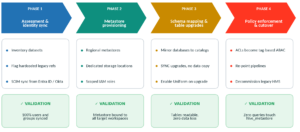
Figure 8: The four UCX migration phases and their validation criteria – Databricks Unity Catalog
| Phase | Objective | Validation criteria |
| 1. Assessment & identity | Inventory legacy HMS estate, unify identities | 100% user/group sync to account console |
| 2. Metastore provisioning | Establish regional metastores and storage paths | Metastore bound to all target workspaces |
| 3. Table upgrades | Move two-level tables to three-level catalogs | Tables verified readable, zero data loss |
| 4. Policy cutover | Enforce ABAC, re-point workloads | Zero queries referencing hive_metastore |
Unity Catalog Migration Case Study: UCX for a Fortune500
To make this concrete: Modak recently led exactly this migration for an enterprise client running Databricks across AWS, Azure, and GCP, moving them off workspace-isolated Hive metastores and onto a unified Unity Catalog governance model.
Modak is a Databricks partner, and its engineering team holds certified expertise in Unity Catalog implementation specifically, not just general Databricks delivery. That distinction matters on migrations like this one: the UCX-based sequencing decisions below, particularly around when to convert ACLs to ABAC and when to enable UniForm, come from having done this migration pattern before, not from reading the documentation once.
The engineering approach followed the UCX phases above, applied to a live multi-cloud estate rather than a greenfield setup. Modak’s team ran the assessment and SCIM identity sync across all workspaces, provisioned regional metastores with scoped IAM bindings, executed the SYNC-based table upgrades with UniForm enabled for cross-engine reads, and translated the client’s existing table ACLs into tag-based ABAC policies before decommissioning the legacy metastores.
The technical decisions that mattered most in practice:
- Using SYNC-based upgrades rather than data copies kept the migration from becoming a parallel storage and reconciliation project.
- Enabling UniForm during the table upgrade phase, not after, meant Trino and DuckDB workloads could read migrated tables from day one without a second migration.
- Converting static ACLs to ABAC policies before cutover, rather than after, avoided a window where newly ingested data would have landed ungoverned.
The measured outcomes from that engagement:
- Eliminated vendor lock-in: UC OSS and UniForm enabled Spark, Trino, DuckDB, and Snowflake to query a single copy of the data, cutting redundant compute and storage.
- 75% reduction in security administration overhead: tag-based ABAC replaced manual dynamic views and per-table grants, with policy enforcement guaranteed on newly ingested datasets.
- 30% reduction in platform runtime cost: native system tables and FinOps integration (Flexera) gave full DBU spend visibility, which drove cluster rightsizing.
- Unified data and AI governance: structured tables, unstructured volumes, ML models, and semantic metrics now sit under one lineage and audit model, covering both analytical and generative AI workloads.
How to Start a Unity Catalog Migration: Next Steps
If you’re evaluating this move, the sequencing matters more than the tooling. Get the identity and SCIM sync right first, since every downstream ABAC policy depends on account-level group membership being accurate. Decide your catalog boundaries (by data mesh tier, by business unit, or both) before you start migrating tables, because re-drawing catalog boundaries after data has landed is far more disruptive than deciding it up front. And enable UniForm during the upgrade phase rather than as a follow-up, if any non-Databricks engines are in your architecture at all.
Unity Catalog’s governance model is comprehensive by design, which is also why migrations benefit from a structured framework like UCX rather than ad hoc scripting. Teams that have done this migration before tend to catch the sequencing issues, like ACL-to-ABAC translation timing, that are easy to get wrong on a first pass.
As a certified Databricks partner with hands-on Unity Catalog implementation experience across multi-cloud enterprise environments, Modak works with data teams on exactly this kind of migration, from initial assessment through policy cutover.
Frequently Asked Questions
How Do You Implement Databricks Unity Catalog Governance and Compliance Across an Enterprise Databricks Estate?
Start with account-level identity and SCIM synchronization, establish the regional metastore, define catalog and schema boundaries, map legacy permissions to the target governance model, and apply required access, audit, and policy controls before cutover.
How Does Account-Level Metastore Governance Compare With Workspace-Level IAM in Unity Catalog?
Account-level metastore governance provides the common governance foundation for data and AI assets across attached workspaces, while workspace-level IAM governs access to the individual workspace and its platform resources. These controls address different layers and can work together.
How Do You Refactor a Two-Level Namespace to Unity Catalog’s Three-Level Namespace?
The migration approach uses UCX to map legacy databases into target catalogs and upgrade tables to the catalog.schema.object structure, followed by workload re-pointing and validation before legacy metastores are decommissioned.
How Does Unity Catalog Unify Governance for Data Models and AI Agents?
Unity Catalog extends governance beyond structured tables to ML models, semantic metrics, document volumes, and AI agent tools, bringing these assets under a common namespace, access-control, lineage, and audit model.